
Get l3 appchain boilerplates right
Before you initialize your first sovereign rollup, align your environment with the boilerplate’s expectations. A mismatched node version or missing dependency is the fastest way to derail a five-minute deployment. Treat these prerequisites as the foundation, not an afterthought.
Verify your node and package manager
Most L3 appchain boilerplates require Node.js 18 or higher. Older versions lack the native modules needed for the underlying rollup infrastructure. Use nvm to manage versions if your system defaults to an outdated release. Ensure npm or pnpm is up to date, as legacy package managers often fail to resolve the monorepo structures common in modern boilerplates.
Secure API keys and RPC endpoints
You will need provider credentials before the first build. Most boilerplates integrate with Alchemy, Infura, or QuickNode for transaction indexing and RPC access. Generate these keys in your provider dashboard before cloning the repo. Storing them in a .env file is standard practice, but never commit this file to your repository. Hardcoded keys are the primary source of early-stage security leaks.
Check local storage and port availability
Appchains often run local databases like Postgres or Redis alongside the execution layer. Ensure ports 5432, 6379, and 8545 are free. If you are running a local Ethereum node or another testnet, it may already occupy these ports. A simple netstat -an | grep 8545 can reveal conflicts. Resolving port collisions early prevents confusing runtime errors during the initial deployment phase.
Deploy an L3 appchain boilerplate in five minutes
You can stand up a fully functional L3 appchain boilerplate for sovereign rollups right on your localhost in under five minutes. This quick setup removes the heavy lifting of configuring ZK rollups, allowing you to focus on the actual application logic rather than infrastructure glue.
The process relies on a standardized containerized environment. By using pre-configured Docker images and environment variables, you bypass the need to manually compile ZK proving systems or configure sequencer nodes. This approach is particularly useful for DevRel teams who need to spin up demo environments rapidly for potential partners or community members.
1. Clone the repository and configure environment
Start by cloning the boilerplate repository to your local machine. This initial step establishes the foundational codebase, including the smart contracts, sequencer configurations, and RPC endpoints. Once cloned, create a .env file from the provided template. You will need to generate a unique RPC URL and configure the sequencer endpoint. These variables act as the switches that tell the boilerplate how to connect to the underlying L2 layer and where to deploy the contracts.
2. Initialize the Docker environment
With your environment variables set, the next step is to initialize the Docker containers. Run the provided docker-compose up command. This command pulls the necessary images and starts the sequencer, the RPC node, and the indexer simultaneously. You should see logs indicating that the sequencer is syncing and the RPC is listening for requests. This stage typically takes less than two minutes, as the images are optimized for quick startup times.
3. Deploy smart contracts and verify
Once the containers are running, deploy your smart contracts to the local L3 environment. Use the provided deployment scripts to push your contracts to the sequencer. After deployment, verify the contract addresses in the block explorer. This step confirms that your contracts are live and interacting with the L3 state correctly. You can now interact with your contracts using standard web3 libraries, just as you would on any other EVM-compatible chain.
4. Test the full stack integration
The final step is to test the full stack integration. Connect your frontend or dApp to the local RPC endpoint. Perform a transaction and verify that it is included in a block and that the state updates correctly. This end-to-end test ensures that your application logic, the sequencer, and the RPC are all communicating effectively. If the transaction succeeds and the state reflects the change, your L3 appchain boilerplate is fully operational.
Clone the repo and set up your .env file with the required RPC and sequencer endpoints. This establishes the connection to the underlying L2 layer.
Run docker-compose up to start the sequencer, RPC node, and indexer. This pulls optimized images and usually takes under two minutes.
Push your smart contracts to the local L3 environment and verify the addresses in the block explorer to confirm they are live.
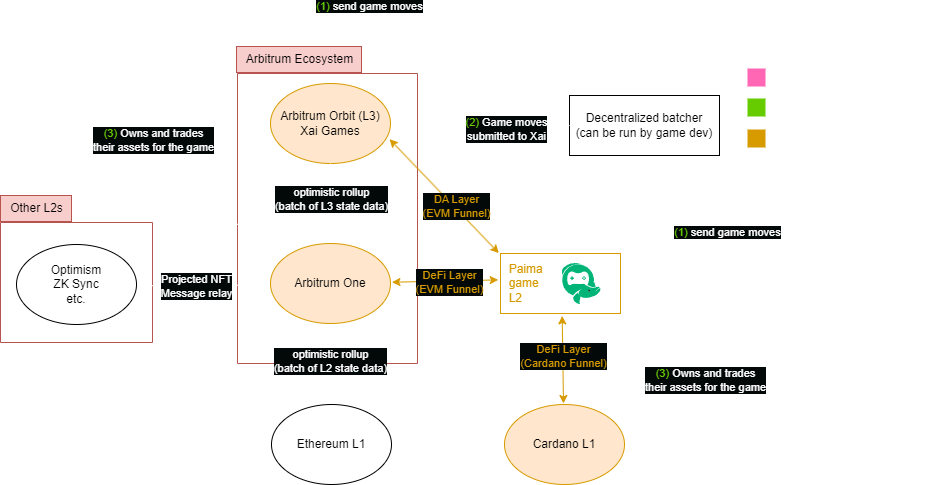
Connect your frontend to the local RPC and execute a transaction. Verify that the state updates correctly to ensure full stack functionality.
Common Mistakes When Deploying L3 Appchain Boilerplates
Even with a ready-to-deploy boilerplate, configuration errors can derail your launch. These boilerplates simplify the heavy lifting of sequencer setup and RPC routing, but they do not remove the need for precise environment management. Below are the most frequent pitfalls that cause deployment failures or insecure mainnets.
Ignoring Environment Variable Precedence
Boilerplates rely on .env files to configure node endpoints, private keys, and gas limits. A common error is mixing local development variables with production secrets. If your local .env overrides production values during a build step, your chain might point to the wrong RPC endpoint or use the wrong sequencer URL. Always verify that your CI/CD pipeline explicitly loads production environment variables, overriding local defaults. Treat your .env files as code: commit templates (.env.example) but never secrets.
Skipping the Local Health Check
Many developers move straight to testnet deployment without verifying the local build. A functional local node is the baseline for any L3 appchain. Before pushing to a public testnet, run the full local test suite and confirm that the sequencer is producing blocks. If the local health check fails, the issue is likely a dependency conflict or a misconfigured network ID, not a network outage. Fixing this locally saves hours of debugging time on-chain.
Hardcoding Contract Addresses
Boilerplates often include sample contracts with hardcoded addresses for testing. Copying these into your production deployment script is a critical error. Your production contracts must be deployed fresh, and their addresses must be dynamically injected into your frontend and backend configurations. Hardcoded addresses from a boilerplate template will point to non-existent or legacy contracts, causing your dApp to fail immediately upon user interaction.
Neglecting Sequencer Redundancy
While boilerplates set up a single sequencer instance for simplicity, production L3 appchains require redundancy. If the sequencer goes down, your chain halts. Ensure your deployment script configures a load balancer or a secondary sequencer node. Check that your RPC providers are configured with fallback URLs so that user transactions can still be routed if the primary sequencer is unreachable.
L3 appchain boilerplates: what to check next
Before committing to a stack, teams often weigh the tradeoffs between speed and sovereignty. Here are the practical answers to the most common objections regarding L3 appchain boilerplates.
These tools shift the focus from infrastructure maintenance to product development. By abstracting the complexity of node management and sequencer setup, teams can validate their unique chain logic faster.
No comments yet. Be the first to share your thoughts!