
Spin up a sovereign rollup locally
You can stand up a fully functional L3 appchain boilerplate for sovereign rollups right on your localhost in under five minutes. This approach lets you test configuration, verify execution environments, and iterate on smart contracts without touching a testnet or spending gas. The process relies on cloning a pre-configured repository and running the local node with a single command.

Open your terminal and pull the source code for the L3 appchain boilerplate. This repository contains the necessary node configuration, genesis files, and smart contract bindings required to initialize a local sovereign rollup. Use the official GitHub link provided in the repository documentation to ensure you are pulling the latest stable build.
Navigate into the cloned directory and run the package manager command to install all required Go, Rust, or JavaScript dependencies. The boilerplate includes a lockfile or go.mod that pins specific versions of the rollup execution engine and consensus layer. Running the install command ensures your local environment matches the exact build tested by the developers.
Run the initialization script to generate the local node keys and genesis block. This step creates the data directory where the chain state will be stored and configures the local RPC endpoints. You can customize the number of validators or the block time parameters in the configuration file before starting the main process.
Execute the start command to launch the sequencer and the local execution layer. The terminal will display real-time block production logs, confirming that the sovereign rollup is active. You can now interact with the local RPC endpoint to deploy contracts or submit transactions, simulating a live L3 environment entirely on your machine.
This local setup provides immediate feedback on your appchain's performance and compatibility. It removes the friction of waiting for block confirmations on public networks, allowing you to iterate rapidly on your specific L3 appchain boilerplate configuration.
Configure the L2 Settlement Layer
Connect your L3 appchain to a Layer 2 network like Base or Starknet to inherit their security and handle final settlement. This step transforms your isolated environment into a production-ready chain that benefits from L2 throughput while maintaining independent execution.
1. Select Your Settlement Layer
Choose the L2 that best fits your application’s needs. Base offers a vibrant ecosystem for consumer applications, while Starknet provides high-throughput capabilities for complex logic. The choice determines your gas mechanics and available tooling.
2. Update Configuration Files
Modify your boilerplate’s configuration to point to the selected L2 RPC endpoints. You will need to input the specific contract addresses for the settlement contracts and update the network IDs to match your target chain. This ensures your L3 nodes communicate correctly with the L2 sequencer.
{
  "settlementLayer": "base",
  "rpcEndpoint": "https://mainnet.base.org",
  "contractAddress": "0x..."
}
3. Verify the Connection
Deploy a test transaction to confirm that your L3 is successfully posting state roots to the L2. Check the block explorer to ensure the settlement is confirmed. A successful connection means your appchain is now synchronized with the L2’s security guarantees.
This setup leverages synchronous composability, allowing your L3 to interact seamlessly with the broader L2 ecosystem. By settling on a robust L2, you gain immediate access to established liquidity and developer tools without managing your own security infrastructure.
Bridge the settlement layer
Before you consider the appchain ready for users, you need to verify that assets can move between the L2 settlement layer and your new L3. This bridge test confirms that the liquidity routing and message passing are functioning correctly. Without this step, your appchain is an isolated island with no way to receive or send value.
Follow these steps to complete the bridge test using the boilerplate configuration.
Open your wallet interface and switch the network to the L2 testnet specified in your boilerplate documentation. Fund the wallet with a small amount of testnet tokens. This provides the gas fees required for the initial deposit transaction on the settlement layer.
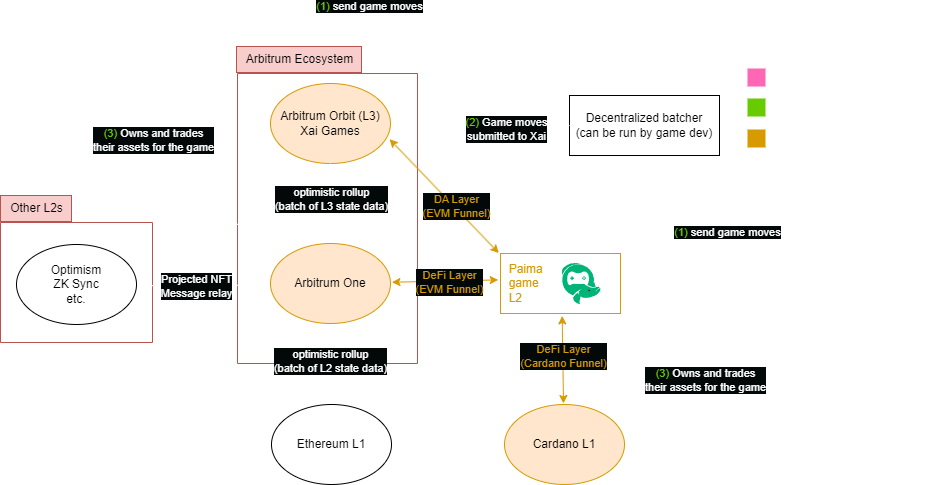
Navigate to the bridge interface provided by your L2 provider. Select the token you wish to test and enter the amount to transfer. In the destination field, ensure you are pointing to the L3 appchain address generated during your deployment. Confirm the transaction and wait for the L2 block confirmation.
Once the L2 transaction is finalized, the bridge relayer picks up the deposit message. Check the L3 explorer or your wallet connected to the L3 network. You should see the balance update automatically. This step proves that the bridge contract on the L3 is correctly listening for and processing messages from the L2.

To complete the cycle, initiate a withdrawal from the L3 back to the L2. This involves locking tokens on the L3 and claiming them on the L2 after the challenge period (if applicable). A successful withdrawal confirms that the full two-way peg is operational and that you can exit the appchain if needed.
If any step fails, check the bridge logs for message relay errors or insufficient gas on the L3. Most boilerplate setups include a local relayer service that you can monitor via terminal output to debug these connectivity issues quickly.
Integrate DevRel kits for adoption
You have the chain running. Now you need developers to build on it and users to use what they build. The boilerplate includes a DevRel kit designed to handle this onboarding automatically, removing the need to build marketing infrastructure from scratch.
This kit acts as the bridge between your technical setup and the broader ecosystem. It standardizes how developers find your documentation and how users discover your dApps.
Prerequisites
Before integrating the kits, ensure you have the following ready:
- A deployed L3 appchain with a known RPC endpoint
- A project name and basic branding assets (logo, color palette)
- Access to the boilerplate repository or deployment dashboard
Checklist: DevRel Components
The DevRel kit is modular. You can enable only what you need. Here are the core components to consider integrating:
- Documentation Portal: A pre-configured Docusaurus or Mintlify instance pulled from the repo. It includes smart contract ABI references and RPC connection guides.
- Community Hub: A templated Discord or Telegram structure with onboarding channels, role assignments, and verification bots.
- Developer Dashboard: A simple Next.js app showing chain stats, block explorers, and faucet links for testnet users.
- Grant Application Form: A pre-built Typeform or Notion page linked to your community hub to streamline funding requests.
Step-by-Step Integration
Follow these steps to connect the DevRel kits to your new chain.

Pull the devrel-kit directory from the boilerplate repository into your project root. This folder contains the static assets and configuration files for the documentation and dashboard.
Open devrel.config.json. Replace the placeholder RPC URLs with your new L3’s endpoints. Update the project name and social links to match your brand.
Run npm run docs:build to generate the static site. Deploy this to your preferred static host (Vercel, Netlify, or GitHub Pages). Ensure the URL is linked in your chain’s metadata.
Initialize the Discord/Telegram templates. Configure the auto-verification bot to check wallet balances or NFT ownership on your new chain. This prevents spam and ensures only real users join.
Why This Matters
Adoption isn’t just about technical stability. It’s about reducing friction for the first 100 developers. By using these pre-built kits, you save weeks of setup time and provide a professional interface that signals legitimacy.
Common l3 appchain: what to check next
L3 appchain boilerplates simplify the process, but developers still face specific technical decisions regarding latency, security, and cost. Understanding these mechanics ensures your deployment runs smoothly from the first commit.
How does L3 latency compare to L2 and L1?
L3s settle transactions on L2s, meaning finality depends on the L2 block time plus the time required for the L3 to submit its state root. For example, on Starknet, an L3 block is typically finalized within seconds, significantly faster than waiting for an L1 block confirmation. This reduced latency makes L3s suitable for high-frequency trading or gaming applications that require near-instant feedback.
What is the security model for an L3 appchain?
Security is derived from the underlying L2. By settling on L2, your L3 inherits the cryptographic proofs and economic security of that layer. You do not need to secure a new validator set or consensus mechanism. Instead, you rely on the L2’s fraud or validity proofs to guarantee state integrity. This shared security model reduces operational overhead while maintaining robust protection against attacks.
How much does it cost to deploy and run an L3?
Deployment costs are minimal because boilerplates handle the complex setup. You primarily pay for L2 gas fees when submitting state roots and execution data. Since L3s compress transactions before sending them to L2, the data availability cost is significantly lower than deploying a standalone L2. Running the L3 node itself is generally cheaper than L2 nodes due to reduced state size and simpler architecture.
No comments yet. Be the first to share your thoughts!