
Why L3 appchain boilerplates matter now
The blockchain landscape is shifting from generic Layer 2s to sovereign Layer 3s. Builders no longer need to compromise on custom logic for the sake of security. L3 appchains allow you to fully control your dApp’s execution environment while settling on an L2, such as Starknet or Optimism. This sovereignty is essential for complex applications that require specific gas tokens, custom precompiles, or tailored state transitions.
Building a rollup from scratch is a months-long engineering undertaking. You must configure sequencers, build data availability layers, and manage decentralization roadmaps. This complexity creates a bottleneck for DevRel efforts, where speed-to-market often determines community adoption.
Boilerplates abstract complex consensus and data availability layers into reusable modules. By leveraging these kits, you can spin up a fully functional L3 in hours. This speed allows DevRel teams to launch testnets, distribute tokens, and gather feedback much earlier in the development cycle.
Setting up the L3 appchain environment
Before deploying your sovereign rollup, you need a working local node. This guide walks through cloning the L3 boilerplate, installing dependencies, and configuring environment variables for a local Starknet-based L3.
Start by cloning the boilerplate repository. The official L3 boilerplate provides the base infrastructure for sovereign rollups.
git clone https://github.com/l3boilerplate/l3-appchain-boilerplate.git
cd l3-appchain-boilerplate
This command pulls the latest codebase, including the necessary contracts and deployment scripts for your L3 appchain.
Once inside the directory, install the required Node.js packages. The boilerplate uses standard npm or yarn commands to set up the development environment.
npm install
# or
yarn install
This step ensures all dependencies, including Starknet tooling and local node scripts, are ready for configuration.
Create a .env file in the root directory. This file controls your node’s connection to the L2 settlement layer and local RPC endpoints.
Replace the placeholder values with your actual Starknet account details. The L2_RPC_URL points to your local Starknet node, while L3_RPC_URL points to your L3 sequencer.
With dependencies installed and environment variables set, start the local L3 node. This command launches the sequencer and indexer services.
npm run start:local
Monitor the terminal output for successful connection logs. You should see messages confirming the L3 is syncing with the L2 settlement layer.
At this stage, your L3 appchain boilerplate is running locally. You can now proceed to deploy your first contract or interact with the local RPC endpoint using standard web3 libraries.
Configuring settlement and sequencing
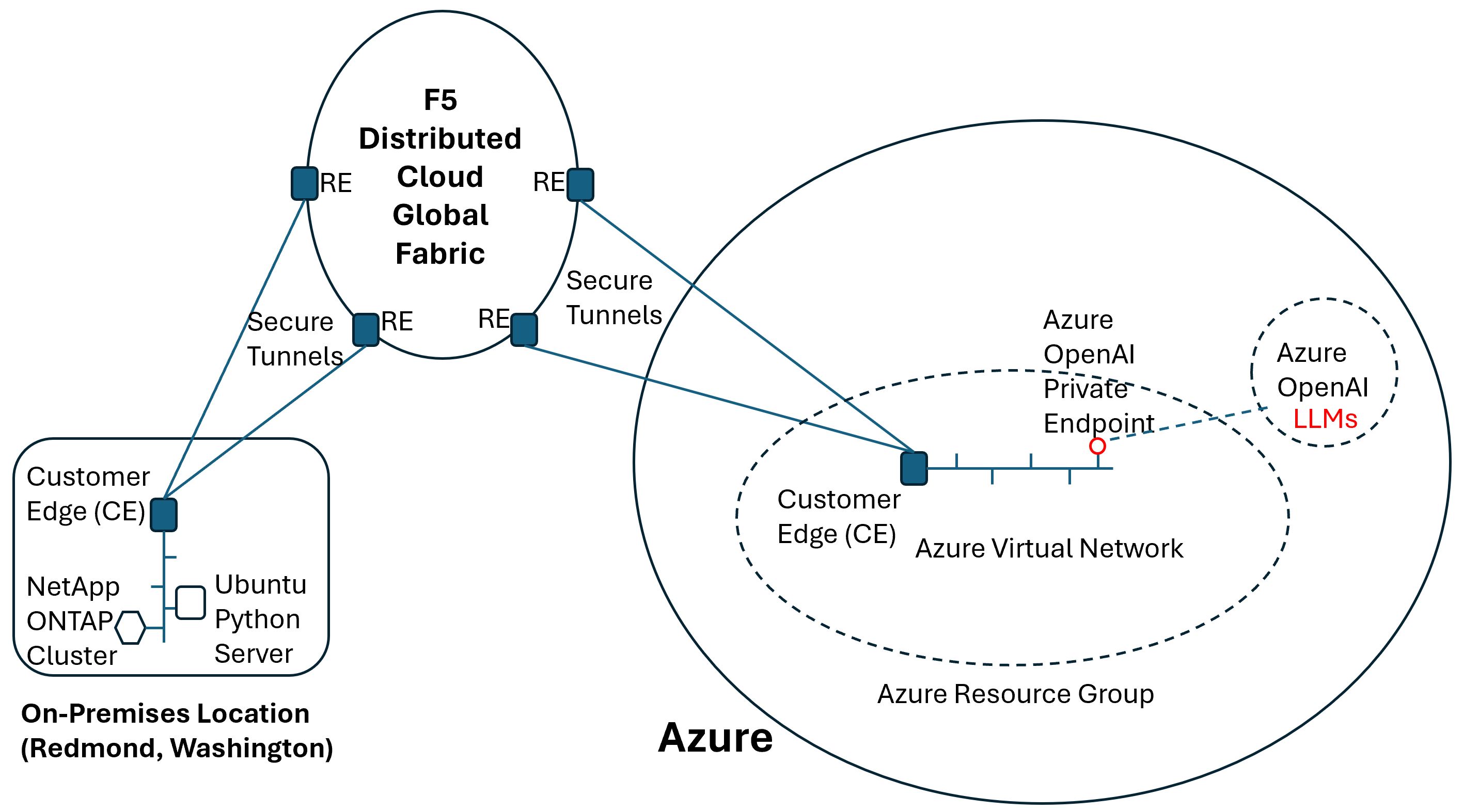
The core of an L3 appchain boilerplate is the bridge between the execution layer and the settlement layer. You are not just connecting two chains; you are establishing a trust boundary. The L3 executes transactions at high speed, while the L2 (or L1) provides the data availability and final consensus. If these two layers are misaligned, the L3 becomes an isolated island rather than a scalable extension of the main network.
To wire this correctly, you must configure the sequencer to post data to the settlement layer and ensure the L3 node can read that data back. This creates a "first-based" architecture where the L3 is cryptographically bound to its L2 foundation.
Before writing any code, identify which L2 will serve as your settlement layer. Common choices include Arbitrum One, Optimism, or Base. In the boilerplate configuration, this is usually set via an environment variable like SETTLEMENT_L2_RPC or a hardcoded address in the config.json. Ensure the L2 network ID matches the chain ID you intend to deploy on. Mismatched chain IDs will cause the sequencer to reject blocks or the L3 node to fail synchronization.
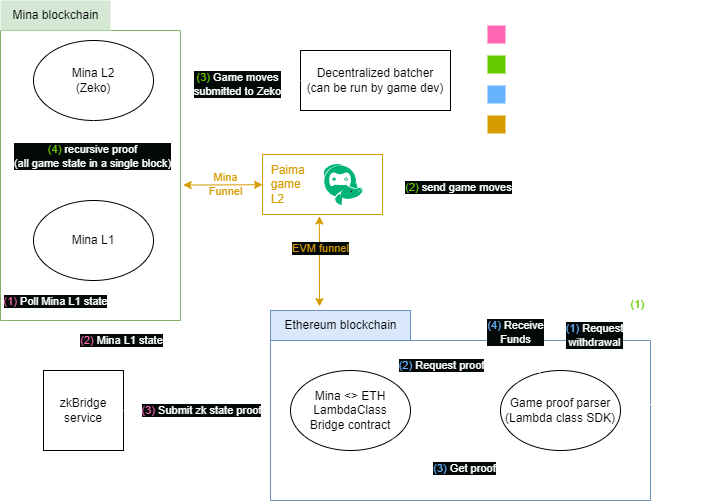
The sequencer is responsible for compressing L3 transactions and posting the resulting data blobs to the L2. In most L3 boilerplates, this is handled by a sequencer service that interacts with the L2's data availability contract. You must configure the sequencer's private key and the L2 gas limit. If you are using a "first-based" model, the sequencer must also post the L3 state root synchronously to the L2 bridge contract. This ensures that the L2 always has the latest state commitment, preventing state divergence.

Your L3 execution node needs to listen to the L2 for new data blobs. Configure the node's data_availability_layer settings to point to the same L2 RPC and contract addresses used by the sequencer. The node will then parse these blobs, reconstruct the L3 blocks, and update its local state. This step is critical for decentralization; if the node cannot read the L2, it cannot verify the sequencer's work. Test this by submitting a transaction and verifying that the L3 node reflects the change after the L2 block is confirmed.

Once both components are wired, run a health check. Submit a transaction on the L3 and monitor the L2 block explorer. You should see a data blob posted by the sequencer. Then, check the L3 node logs to confirm it has processed that blob. If the L3 state does not match the L2 commitment, you have a configuration error. Common issues include incorrect contract addresses or insufficient L2 gas for the sequencer to post data. Resolve these by adjusting the gas_limit in the sequencer config or updating the bridge contract address.
L3 transactions are not final until the L2 block containing the data blob is confirmed. Ensure your application logic accounts for this latency. If your dApp requires instant finality, consider using an optimistic verification layer or adjusting your user experience to reflect the settlement time.
Deploying DevRel Assets
The boilerplate includes pre-configured components for landing pages, documentation, and authentication. These assets remove the friction of setting up separate marketing stacks, allowing you to focus on the chain's unique value proposition.
Landing Page Integration
The boilerplate provides a Next.js-based landing page template. It is pre-connected to the chain's RPC endpoint and includes wallet connection logic using standard Wagmi or RainbowKit configurations. You only need to update the metadata—title, description, and social links—to reflect your specific appchain.
Documentation and Auth
Developer onboarding begins with the included Docsify or Docusaurus setup. The boilerplate ships with a basic "Getting Started" guide that explains how to connect a wallet and interact with the testnet. Authentication is handled via a simple email or social login wrapper, ensuring that non-crypto-native users can access the application without managing private keys immediately.
Verify the rollup is live
Once deployment completes, immediate verification ensures your L3 appchain boilerplate is processing transactions correctly. You need to confirm that the chain is syncing with its L2 settlement layer and that the sequencer is publishing data without delays.
Start by checking the block height on your L3 against the L2 anchor. If you are using a stack like Spire Pylon, verify that the L3 is synchronously reading data from the L2 settlement layer in real-time. Any lag here indicates a disconnect in the data availability or sequencer pipeline.
Run this quick pre-launch checklist to ensure stability:
-
Confirm L3 block height is incrementing.
-
Verify L2-to-L3 data sync latency is under 2 seconds.
-
Test a simple transaction and confirm it appears on a block explorer.
-
Check sequencer logs for dropped messages or reorgs.
If the block height stalls, review your sequencer configuration and ensure the L2 RPC endpoint is accessible. Most boilerplate errors stem from misconfigured polling intervals or incorrect contract addresses.
Common L3 boilerplate setup errors
Even with a ready-made L3 appchain boilerplate, configuration drift can derail your mainnet launch. The following pitfalls are the most frequent causes of deployment failures and network instability.
Missing dependency versions
Boilerplates often rely on specific forked versions of geth or erigon. If your local development environment pulls the latest upstream release instead of the pinned version, consensus bugs may appear during block production. Always check the go.mod or package.json lock files to ensure your build matches the template’s tested state.
Incorrect genesis configuration
The genesis.json file dictates your chain’s initial state. A common error is misconfiguring the alloc field, which assigns initial balances to accounts. If you omit the deployer address or misplace the decimal points in token supplies, your chain will start with zero liquidity. Validate this file against the boilerplate’s reference example before initializing the node.
Overlooking RPC port conflicts
L3 solutions typically run multiple services: the sequencer, the RPC node, and the indexer. If these services are not assigned distinct ports in your .env or docker-compose file, they will fail to bind. Check for conflicts between port 8545 (HTTP) and 8546 (WebSocket) to ensure your frontend can connect to the chain without interruption.
Frequently asked questions about L3 boilerplates
How much does it cost to deploy an L3 appchain?
Deployment costs vary by infrastructure provider and network choice. Using an L3 appchain boilerplate typically requires covering base infrastructure fees for sequencers and data availability layers, plus gas costs for initial contract deployment. Many providers offer tiered pricing based on transaction volume and storage needs. You can estimate initial setup costs by reviewing the pricing models of platforms like L3Boilerplate, which often charge a one-time deployment fee plus monthly infrastructure retainers.
Can I customize the VM and tokenomics?
Yes, most L3 appchain boilerplates are built on modular stacks that allow deep customization. You can configure the virtual machine (EVM, WASM, or custom), set up native token standards, and define governance parameters. The boilerplate handles the complex infrastructure, but you retain control over the application layer. This allows you to tailor the chain to your specific dApp requirements without managing low-level node operations.
What kind of support is included?
Support levels depend on the boilerplate provider. Standard packages often include documentation, community forums, and basic email support for deployment issues. For critical production environments, premium tiers may offer dedicated engineering support, SLA guarantees, and security audits. Always verify the support scope before committing, as L3 infrastructure can be complex to troubleshoot if issues arise with sequencer sync or DA layer connectivity.
How long does deployment take?
With a pre-configured L3 appchain boilerplate, you can go from zero to a deployed testnet in under an hour. Mainnet deployment typically takes a few hours, depending on the finalization time of your chosen data availability layer and sequencer configuration. The boilerplate automates the provisioning of nodes, RPC endpoints, and explorer interfaces, significantly reducing the time compared to building from scratch.
Are these chains secure?
L3 appchain boilerplates inherit security from their underlying Layer 1 and Layer 2 frameworks. Most use Ethereum for finality and data availability, ensuring that your appchain benefits from Ethereum's robust security model. However, you are responsible for the security of your smart contracts and application logic. Always conduct thorough audits of your custom code, as the boilerplate itself is generally stable and well-tested.
No comments yet. Be the first to share your thoughts!