
Spin up a sovereign rollup locally
You can stand up a fully functional L3 appchain boilerplate for sovereign rollups right on your localhost in under five minutes. This quick setup gives you an immediate, isolated environment to test custom logic without touching mainnet funds or waiting for external block confirmations.
The goal here is speed and isolation. By running the node locally, you verify that your smart contracts, sequencer configurations, and state transitions behave exactly as expected before you consider any deployment steps. Think of this local instance as your private proving ground—a sandbox where you can break things without consequence.
Start by fetching the source code from the official L3 Appchain Boilerplate repository. Use git clone to pull the latest stable branch into your local development directory. This repository contains the pre-configured monorepo structure, including the sequencer, prover, and smart contract interfaces needed for a sovereign rollup.
Navigate into the cloned directory and run the dependency installer. For most monorepo setups, this means executing pnpm install or yarn to fetch all necessary libraries. Once dependencies are resolved, run the build command to compile the smart contracts and the sequencer binary. This step ensures all components are linked and ready for execution.
Create a .env file in the root directory based on the provided .env.example. You will need to set the L3_PROVIDER_URL to point to your local Ethereum node (or a local testnet RPC like Hardhat or Anvil) and configure the sequencer port. Ensure the CHAIN_ID matches the local testnet you intend to use, preventing any chain ID mismatch errors during transaction signing.
Execute the start script, typically npm run start:local or docker compose up. This command launches the sequencer, which begins accepting transactions, and the local prover, which generates ZK proofs for the state transitions. Within seconds, you should see logs indicating that blocks are being produced and committed to your local execution layer.

Use a local block explorer or a simple script to query the latest block number. If the block height is incrementing and transactions are being processed, your sovereign rollup is live. You can now deploy your custom contracts to this local L3 instance and begin testing your application's core logic in a fully sovereign, offline-capable environment.
Configure the L2 settlement layer
Connecting your L3 appchain to an L2 settlement layer is the step that transforms a standalone node into a secure, scalable network. This connection ensures your L3 can read state from the L2, guaranteeing data availability and inheriting the security model of the underlying layer.
We will use Spire to configure this relationship. The following steps walk you through selecting the L2 provider, configuring the bridge, and verifying the connection.
In your spire.config.ts, specify the L2 network you want to settle on. Popular choices include Base, Starknet, or Arbitrum. This setting determines where your L3's data proofs will be submitted.
Define the bridge contract address and the gas limit for submitting state roots. Accurate gas limits prevent transaction failures when your L3 posts data to the L2.
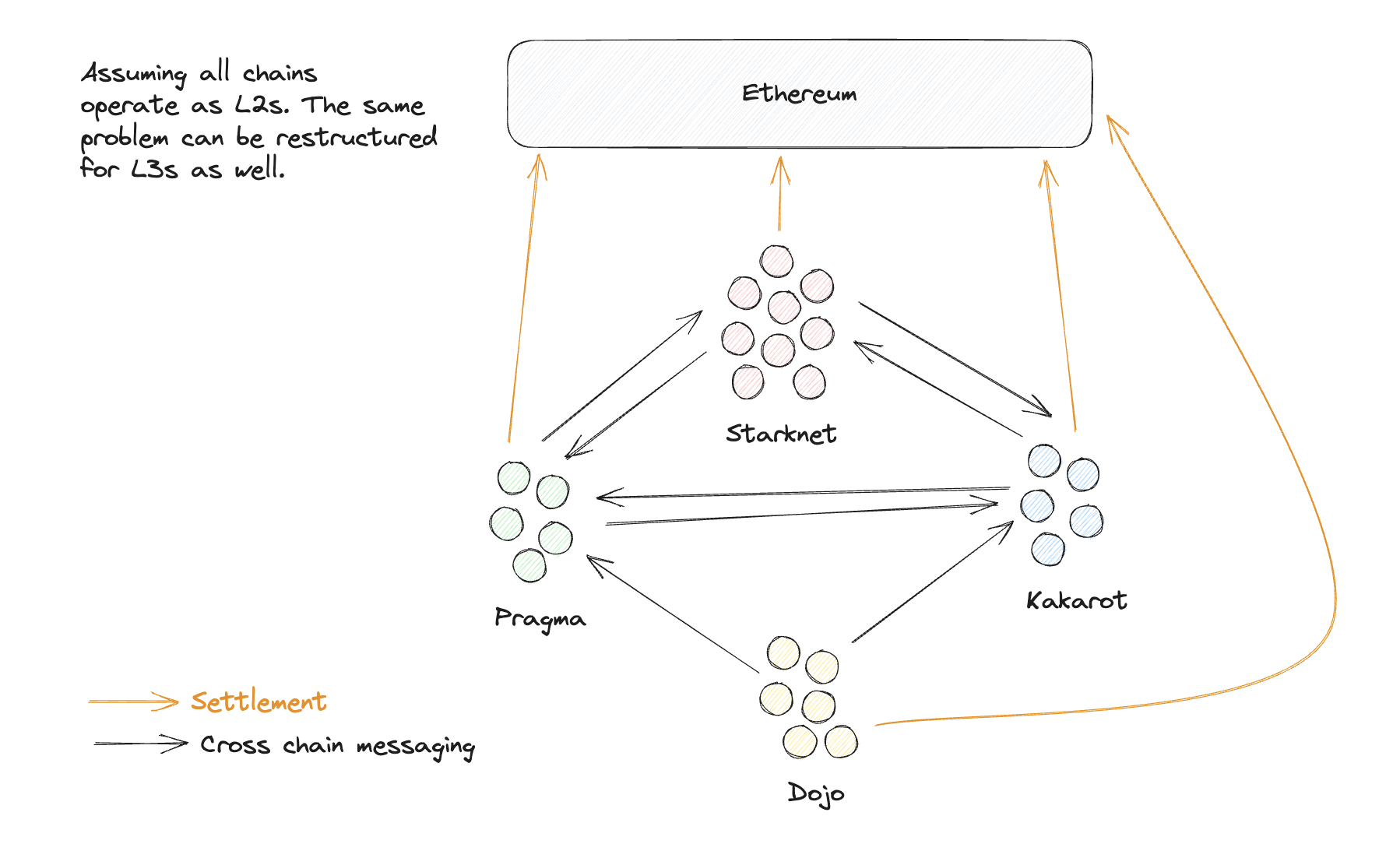
Run a local test to ensure your L3 can synchronously read data from the L2 settlement layer in real-time. This confirms your appchain is properly anchored.
This configuration ensures your L3 appchain operates with the security guarantees of its chosen L2, allowing you to focus on application logic rather than consensus mechanics.
Configure RPC endpoints and bridges
Your L3 appchain boilerplate is running locally, but users and frontends still need a way to talk to it. This section walks through exposing reliable RPC endpoints and verifying that the bridge mechanism correctly passes messages between your L3 and the underlying L2.
1. Expose the RPC endpoint
By default, your node only accepts connections from localhost. To allow external frontends to interact with the chain, you need to bind the RPC server to 0.0.0.0.
2. Configure the bridge contract
The bridge is the critical link between your L3 and the L2. You need to ensure the bridge contracts are deployed and the state roots are being posted correctly.
3. Test end-to-end messaging
The final step is to verify that assets can move from L2 to L3 and back. This confirms your RPC endpoints are accessible and the bridge logic is sound.
Integrate DevRel kits for adoption
Technical setup is only half the equation. To turn your L3 appchain into a scalable ecosystem, you need to lower the barrier for other developers and users. This is where DevRel kits come in. They provide the pre-built components, documentation, and onboarding flows that allow third parties to integrate with your chain without starting from scratch.
Think of your appchain as a new neighborhood. The DevRel kit is the infrastructure that makes it livable: paved roads, clear addresses, and ready-to-move-in houses. Without it, builders face friction and ambiguity. With it, they can focus on their specific application logic rather than wrestling with cross-chain compatibility or custom node setup.
Start by integrating the official DevRel SDK into your boilerplate repository. This typically includes:
- Pre-configured Wallet Connectors: Ensure users can connect their wallets seamlessly without custom backend logic.
- Standardized API Endpoints: Provide clear, versioned endpoints for reading chain state and submitting transactions.
- Onboarding Documentation: Include a "Quick Start" guide that walks a new developer through their first test transaction on your L3.
By embedding these tools directly into your boilerplate, you transform your technical setup into a self-service platform. Other builders can clone your repo, swap out the branding, and deploy their own instance or dApp on top of your L3. This network effect is what turns a single appchain into a thriving ecosystem.
Verify production readiness
Before pushing your L3 appchain boilerplate to mainnet, treat this phase as the final safety inspection. A rushed deployment introduces risks that are costly to fix later. Use this checklist to confirm stability, security, and operational readiness.
-
Node Health: Verify all sequencer and validator nodes are syncing correctly and responding to RPC calls.
-
Security Audit: Confirm that smart contracts have passed automated static analysis and, if budget allows, a third-party audit.
-
Gas & Fees: Test transaction throughput under load to ensure gas estimation remains accurate during peak usage.
-
Monitoring: Ensure Prometheus and Grafana dashboards are live and alerting on critical failures.
-
Disaster Recovery: Validate that you can restore the state from a snapshot and that key management protocols are secure.
No comments yet. Be the first to share your thoughts!